Pages
Last updated: October 29, 2024
Pages allow you to create a suite of related views in one place, allowing you to organize your dashboards by desired users, reporting goal, etc. Instead of creating multiple dashboards to navigate, pages allow you to embed several dashboards within a single package. Additionally, Pages can be standalone or within Folders (sections) for easier organization. Accessing the Page menu can be done by selecting the “Edit” module within any Dashboard (blue pencil icon). Once selected, a “Manage Pages” element will become available. In this view, you will be able to add or modify Pages and organize them within Sections.

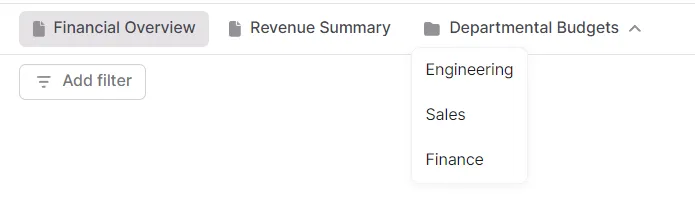
Each individual Page will exist as a tab at the top of the Dashboard, while folders will create an additional layer. The “Manage pages” example above will look like this once saved:
Each Page within a Section is an individual Dashboard, and its functionality will be exactly the same as any standalone Dashboard.